








Capture exceptions for error tracking
Contents
You can track and monitor errors and exceptions in your code by capturing exception events. This can be done automatically when exceptions are thrown in your code, or manually by calling the exception capture method.
Capturing exceptions
Exceptions are a special type of event in PostHog. Similar to any other event, they can be captured, customized, filtered, and used in insights for analysis.
To help group exceptions into issues and help you debug them, PostHog automatically captures the following properties:
| Name | Key | Example value |
|---|---|---|
$exception_list | List | A list of exceptions that occurred. In languages that support chained exceptions, the list will contain multiple items. Contains the following properties: |
└─ type | String | The type of exception that occurred |
└─ value | String | The message of the exception that occurred |
└─ stacktrace | Object | Contains a list of stack frames that occurred |
└─ mechanism | Object | If the stacktrace is handled and if it's synthetic |
$exception_fingerprint | String | A fingerprint of the exception |
$exception_level | String | The level of the severity of the error |
Like normal events, it's important to identify the user when capturing exceptions.
If you serve minified or compiled code, PostHog needs source maps to display the correct stack traces. Configure source maps to get the most out of your exception events.
Automatic exception capture
If you followed one of our guides to set up error tracking and you enabled exception auto capture, you'll have automatic exception capture enabled.
For browser SDKs (JavaScript Web, React, Next.js, etc.), you can configure which types of errors are automatically captured using the capture_exceptions option:
| Option | Default | Description |
|---|---|---|
capture_unhandled_errors | true | Captures uncaught errors via window.onerror. |
capture_unhandled_rejections | true | Captures unhandled promise rejections via window.onunhandledrejection. |
capture_console_errors | false | Captures calls to console.error as exception events. |
You can also pass capture_exceptions: true to enable all default options, or capture_exceptions: false to disable autocapture entirely.
Manual exception capture
You can also manually call the exception capture method.
Never manually capture $exception events using posthog.capture('$exception', {...}). Always use posthog.captureException(error) instead - it handles the correct event format, stack trace processing, and source map integration automatically.
Add exception steps
Available in
posthog-js1.370.0 and later.
Exception steps are lightweight breadcrumbs you attach to an exception before calling captureException(...). They are buffered in memory, added to the next exception as $exception_steps, and shown in the session timeline.
Use them for high-signal checkpoints like:
- Checkout or onboarding milestones
- API calls and retries
- Feature flag decisions
- Validation checkpoints
How they work
- Steps are buffered locally until an exception is captured.
- They are attached to the exception under
$exception_steps. - They are not sent as standalone PostHog events.
- Buffered steps are also included on automatically captured exceptions.
Example
Configure limits
The buffer is byte-aware: when the budget is exceeded, the oldest steps are evicted. The default is 32KB.
Best practices
- Use short step names that describe a checkpoint or action.
- Keep payloads small and focused.
- Avoid sensitive data, raw request bodies, and large nested objects.
- Use the
before_sendcallback to redact exception steps before they are sent. - Add steps before the risky operation runs.
Troubleshooting missing steps
If an exception appears in error tracking but not in the timeline with steps:
- Make sure you called
addExceptionStep(...)before the failure. - Use
captureException(...)or autocapture, notposthog.capture('$exception', ...). - Reduce step payload size if the final event is too large.
Error boundaries
Error boundaries let you catch rendering errors in your component tree and report them to PostHog. We currently support error boundaries for:
- React – Use the
PostHogErrorBoundarycomponent. See the React error boundaries guide. - React Native – Use the
PostHogErrorBoundarycomponent. See the React Native error boundaries guide.
Customizing exception capture
Like all data, the better quality of your exception events, the more context you'll have for debugging and analysis. Customizing exception capture helps you do this.
Customizing exception capture lets you override exception properties to influence how they're grouped into issues.
Equally important, you can customize properties on the exceptions to help you configure rules for automatic issue assignment, alerts, issue grouping. They can also be used in analysis in insights, dashboards, and data warehouse queries.
Customizing exception properties
During manual capture
When capturing exceptions manually, passing properties to the capture exception method adds them to the event just like any other PostHog event.
You can also override the fingerprint to group exceptions together at capture time.
Here are some examples of how to override exception properties:
During automatic capture
When automatic exception capture is enabled, you can still override the default properties and add custom properties to the exception event.
You can also override the fingerprint to group exceptions together at capture time.
The process is slightly different depending on the SDK you're using.
In JavaScript Web and Node.js SDKs, you can override the default properties by passing a before_send callback. This callback is called before any exception is captured.
In React Native, you can override the default properties by passing a before_send callback when initializing PostHog. This callback is called before any exception is captured.
In Python, you can override the default properties through the use of contexts and tags.
Capturing properties for custom issue grouping rules
Other than grouping with custom fingerprints, you can also set custom properties on the exception to help you group exceptions together using issue grouping rules.
For example:
- Setting fields like
db_transactionto group exceptions together for a specific database transactions. - Setting
feature_name,service_name, orservice_versionto group exceptions together for a specific features and services. - Setting
intentto group exceptions due to common interactions like accessing storage or network.
It's important to think about your grouping rules when you configure exception capture. You cannot group exceptions together if you don't set some common properties between them.
Note that grouping issues means that all exceptions will be grouped together under a single issue. You cannot group exceptions into multiple issues, but you can still filter on custom properties across multiple issues without grouping them.
Suppressing exceptions
We recommend that you suppress exceptions on the client side for performance and cost reasons.
You can use the before_send callback in the web, Node.js, and React Native SDKs to exclude any exception events you do not wish to capture. Do this by providing a before_send function when initializing PostHog and have it return a falsey value for any events you want to drop.
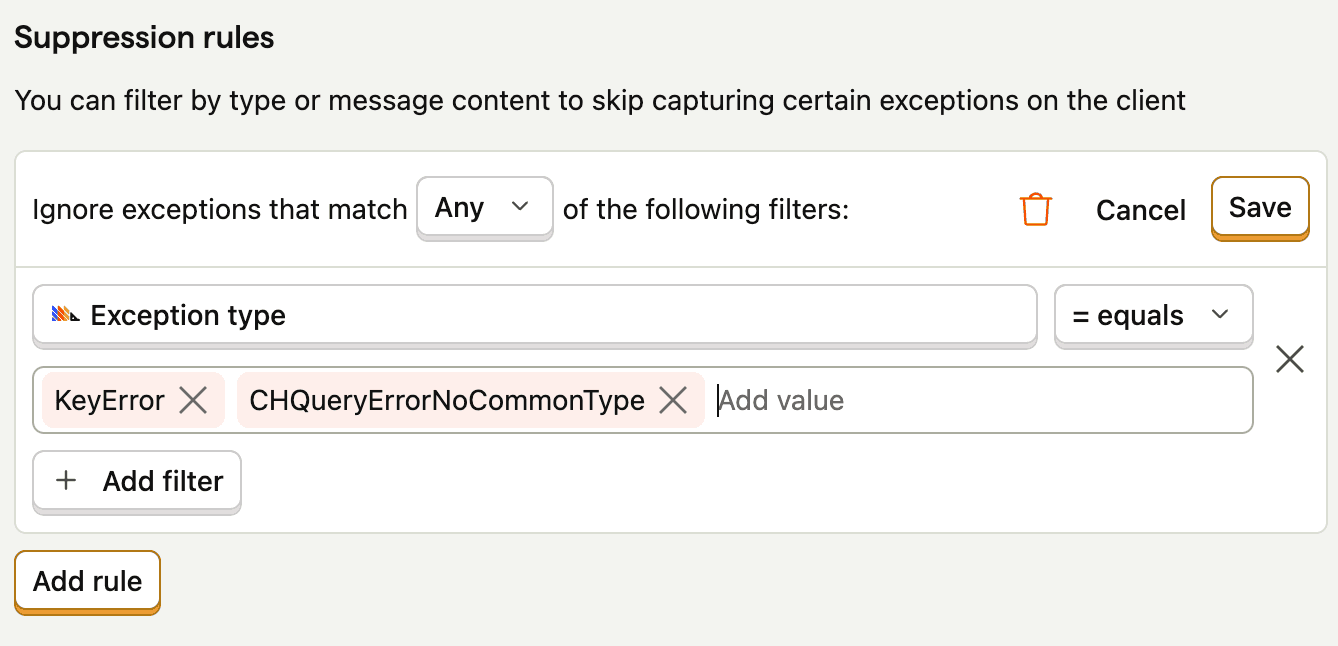
You can also suppress exceptions in PostHog, these rules will be applied client-side.
Autocaptured exceptions can be ignored client-side by configuring suppression rules in PostHog settings. You can only filter based on the exception type and message attributes because the stack of an exception may still be minified client-side.
Burst protection
The JavaScript web SDK uses burst protection to limit the number of autocaptured exceptions that can be captured in a period. This prevents an excessive amount of exceptions being captured from any one client, typically because they're being thrown in an infinite loop.
By default, we capture 10 exceptions (bucket size) of the same type within a 10 second period before the rate limiter kicks in, after which, we capture 1 exception (refill rate) every 10 seconds.
Often not needed, but you can change the bucket size and refill rate as part of your configuration:
Common problems
Exception steps don't appear in the session timeline
If you can see the exception in error tracking but not its steps in the timeline, the most common causes are:
- The steps were recorded after the exception was captured.
- The server-side code didn't have an active request or job scope.
- The exception wasn't linked to the same user or session as the replay.
- The step payload was too large and got truncated or dropped.
Start by verifying identification and session linkage, then confirm your steps are being added immediately before the risky operation.
Don't use posthog.capture() for exceptions
Do not use posthog.capture('$exception', { ... }) and try to attach exception metadata yourself (e.g. $exception_stack_trace_raw, $exception_type, $exception_message). This approach fails in the vast majority of cases because the exception event schema is strict and the SDK does not normalize or validate these properties when you use capture().
Do this instead: use posthog.captureException(error). It accepts an Error object (or your runtime's equivalent), extracts stack trace, type, and message correctly, and sends a valid $exception event with all required metadata. You can still pass optional properties as the second argument.